Segmentation inspection
Segmentation quality should be inspected both visually and quantitatively. In this module we compare segmentation outputs against a reference segmentation using a minimal and practical set of checks that are easy to apply in teaching and in daily analysis workflows.
Prerequisites
Before starting this lesson, you should be familiar with:
Learning Objectives
After completing this lesson, learners should be able to:
Visually inspect segmentation quality by overlaying segmentations on the raw image
Compute IoU for semantic segmentation by converting label masks to binary masks
Compare instance segmentations using object counts and mean object area
Concept map
Figure
Activities
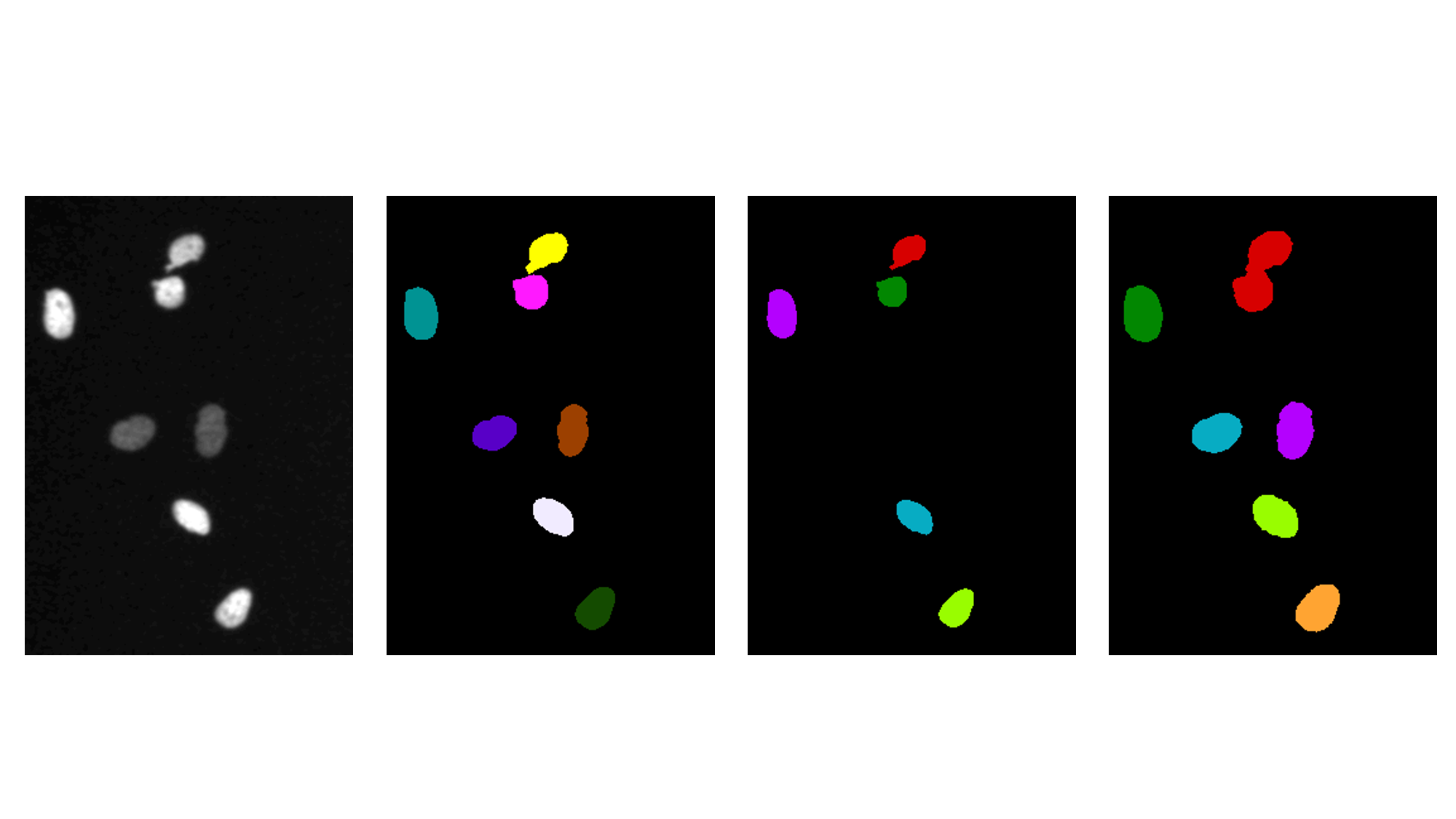
Visual inspection by overlaying segmentations on the raw image
- Open the raw image xy_8bit__mitocheck_incenp_t1.tif
- Open the reference segmentation xy_8bit_labels__mitocheck_incenp_t1.tif
- Open the lower-threshold segmentation xy_8bit_labels__mitocheck_incenp_t1_low_threshold.tif
- Open the higher-threshold segmentation xy_8bit_labels__mitocheck_incenp_t1_high_threshold.tif
- Overlay each segmentation with the raw image and inspect typical error patterns (missing foreground, extra foreground, merged objects, split objects)
Show activity for:
ImageJ GUI
Visual inspection by overlaying segmentations on the raw image
- Open xy_8bit__mitocheck_incenp_t1.tif
- Open xy_8bit_labels__mitocheck_incenp_t1.tif
- Open xy_8bit_labels__mitocheck_incenp_t1_low_threshold.tif
- Open xy_8bit_labels__mitocheck_incenp_t1_high_threshold.tif
- For each label image, create an overlay on the raw image:
- Select the label image and add the raw image as overlay using [Image > Overlay > Add Image…]
- Opacity: 50 %
- Compare overlays and discuss visible error types:
- Missing foreground
- Extra foreground
- Merged objects
- Split objects
skimage napari
# %%
# Visual inspection of segmentation overlays

# %%
# Create a napari viewer
import napari

viewer = napari.Viewer()

# %%
# Load raw and segmentation images
from OpenIJTIFF import open_ij_tiff

raw_url = "https://github.com/NEUBIAS/training-resources/raw/master/image_data/xy_8bit__mitocheck_incenp_t1.tif"
gt_url = "https://github.com/NEUBIAS/training-resources/raw/master/image_data/xy_8bit_labels__mitocheck_incenp_t1.tif"
low_url = "https://github.com/NEUBIAS/training-resources/raw/master/image_data/xy_8bit_labels__mitocheck_incenp_t1_low_threshold.tif"
high_url = "https://github.com/NEUBIAS/training-resources/raw/master/image_data/xy_8bit_labels__mitocheck_incenp_t1_high_threshold.tif"

raw, *_ = open_ij_tiff(raw_url)
gt_labels, *_ = open_ij_tiff(gt_url)
low_labels, *_ = open_ij_tiff(low_url)
high_labels, *_ = open_ij_tiff(high_url)

# %%
# Overlay all segmentations on top of the raw image
viewer.add_image(raw, name="raw")
viewer.add_labels(gt_labels, name="ground_truth", opacity=0.45)
viewer.add_labels(low_labels, name="low_threshold", opacity=0.45)
viewer.add_labels(high_labels, name="high_threshold", opacity=0.45)

# %%
# Close viewer at the end so the script can run in automated tests
viewer.close()
Semantic comparison using IoU
- Open the reference and candidate segmentation masks
- Convert each label mask to a binary mask (foreground > 0)
- Compute the IoU against the reference for the low-threshold and high-threshold results
- Compare which thresholding result gives the higher IoU and discuss why
Show activity for:
ImageJ GUI
Semantic comparison with IoU in ImageJ GUI
- Open xy_8bit_labels__mitocheck_incenp_t1.tif as reference
- Open xy_8bit_labels__mitocheck_incenp_t1_low_threshold.tif
- Open xy_8bit_labels__mitocheck_incenp_t1_high_threshold.tif
Prepare binary masks (foreground > 0)
For each image (reference and candidate):
- Convert to 8-bit using [Image > Type > 8-bit] if needed
- Set threshold using [Image > Adjust > Threshold…]
- Lower threshold:
1- Upper threshold: maximal value
- Press
Applyto create a binary imageCompute IoU for one candidate mask
Let
Ref_binbe the reference binary image andCand_binbe one candidate binary image.
- Compute intersection with [Process > Image Calculator…]
- Operation:
AND- Image1:
Ref_bin- Image2:
Cand_bin- Compute union with [Process > Image Calculator…]
- Operation:
OR- Image1:
Ref_bin- Image2:
Cand_bin- Count foreground pixels (value
255) in both images using [Analyze > Histogram]
N_intersection: count at value 255 in the AND imageN_union: count at value 255 in the OR image- Compute IoU:
IoU = N_intersection / N_unionRepeat this for both low-threshold and high-threshold candidates and compare their IoU values.
skimage napari
# %%
# Semantic segmentation comparison using IoU

# %%
# Load segmentation label masks
import numpy as np
from OpenIJTIFF import open_ij_tiff

gt_url = "https://github.com/NEUBIAS/training-resources/raw/master/image_data/xy_8bit_labels__mitocheck_incenp_t1.tif"
low_url = "https://github.com/NEUBIAS/training-resources/raw/master/image_data/xy_8bit_labels__mitocheck_incenp_t1_low_threshold.tif"
high_url = "https://github.com/NEUBIAS/training-resources/raw/master/image_data/xy_8bit_labels__mitocheck_incenp_t1_high_threshold.tif"

gt_labels, *_ = open_ij_tiff(gt_url)
low_labels, *_ = open_ij_tiff(low_url)
high_labels, *_ = open_ij_tiff(high_url)

# %%
# Convert label masks to binary masks for semantic comparison
# Foreground is any pixel with value > 0.
gt_binary = np.asarray(gt_labels) > 0
low_binary = np.asarray(low_labels) > 0
high_binary = np.asarray(high_labels) > 0

# %%
# Compute intersection-over-union (IoU)
def compute_iou(reference_mask, candidate_mask):
    intersection = np.logical_and(reference_mask, candidate_mask).sum()
    union = np.logical_or(reference_mask, candidate_mask).sum()
    return float(intersection / union) if union > 0 else 0.0


low_iou = compute_iou(gt_binary, low_binary)
high_iou = compute_iou(gt_binary, high_binary)

print(f"IoU (low threshold vs ground truth):  {low_iou:.4f}")
print(f"IoU (high threshold vs ground truth): {high_iou:.4f}")
Instance comparison using object count and mean object area
- Open the reference and candidate segmentation masks
- Treat non-zero pixels as foreground and label connected components as instances
- Compute the number of objects in each segmentation
- Compute the mean object area in each segmentation
- Compare differences to the reference and interpret whether a segmentation tends to over-segment or under-segment
Show activity for:
ImageJ GUI
Instance comparison using object count and mean object area
- Open xy_8bit_labels__mitocheck_incenp_t1.tif as reference
- Open xy_8bit_labels__mitocheck_incenp_t1_low_threshold.tif
- Open xy_8bit_labels__mitocheck_incenp_t1_high_threshold.tif
For each image:
- If needed, convert to binary mask using [Image > Adjust > Threshold…] and
Apply- Set measurements using [Analyze > Set Measurements…]
- Select
Area- Select
Display Label- Run connected components and measurements using [Analyze > Analyze Particles…]
Size:0-InfinityCircularity:0.00-1.00- Select
Display resultsandSummarize- Record from the
Summarytable:
CountAverage SizeCompare
CountandAverage Sizefor low-threshold and high-threshold segmentations against the reference.
skimage napari
# %%
# Instance segmentation comparison: object counts and mean object area

# %%
# Load segmentation label masks
import numpy as np
from skimage.measure import label, regionprops_table
from OpenIJTIFF import open_ij_tiff

gt_url = "https://github.com/NEUBIAS/training-resources/raw/master/image_data/xy_8bit_labels__mitocheck_incenp_t1.tif"
low_url = "https://github.com/NEUBIAS/training-resources/raw/master/image_data/xy_8bit_labels__mitocheck_incenp_t1_low_threshold.tif"
high_url = "https://github.com/NEUBIAS/training-resources/raw/master/image_data/xy_8bit_labels__mitocheck_incenp_t1_high_threshold.tif"

gt_labels, *_ = open_ij_tiff(gt_url)
low_labels, *_ = open_ij_tiff(low_url)
high_labels, *_ = open_ij_tiff(high_url)

# %%
# Convert to connected-component instances and compute summary statistics
def instance_stats(label_like_image):
    binary = np.asarray(label_like_image) > 0
    instance_labels = label(binary)
    object_count = int(instance_labels.max())

    if object_count == 0:
        return object_count, 0.0

    props = regionprops_table(instance_labels, properties=("area",))
    mean_area = float(np.mean(props["area"]))
    return object_count, mean_area


gt_count, gt_mean_area = instance_stats(gt_labels)
low_count, low_mean_area = instance_stats(low_labels)
high_count, high_mean_area = instance_stats(high_labels)

# %%
# Print direct comparison against the reference segmentation
print("Reference (ground truth):")
print(f"  object count   = {gt_count}")
print(f"  mean area      = {gt_mean_area:.2f}")
print()
print("Low-threshold segmentation:")
print(f"  object count   = {low_count} (difference: {low_count - gt_count:+d})")
print(f"  mean area      = {low_mean_area:.2f} (difference: {low_mean_area - gt_mean_area:+.2f})")
print()
print("High-threshold segmentation:")
print(f"  object count   = {high_count} (difference: {high_count - gt_count:+d})")
print(f"  mean area      = {high_mean_area:.2f} (difference: {high_mean_area - gt_mean_area:+.2f})")
Assessment
Fill in the blanks
- IoU is computed as intersection divided by ___.
- For semantic IoU in this module, label masks are first converted to ___.
Solution
- union
- binary masks
Follow-up material
Recommended follow-up modules:
Learn more: